Last updated: 2026/6/1
Logging out of SocialDog
This section describes how to log out from SocialDog.
Logging out allows you to log in to a different SocialDog Account than the one you were previously logged into.
Log Out from SocialDog in Your Browser
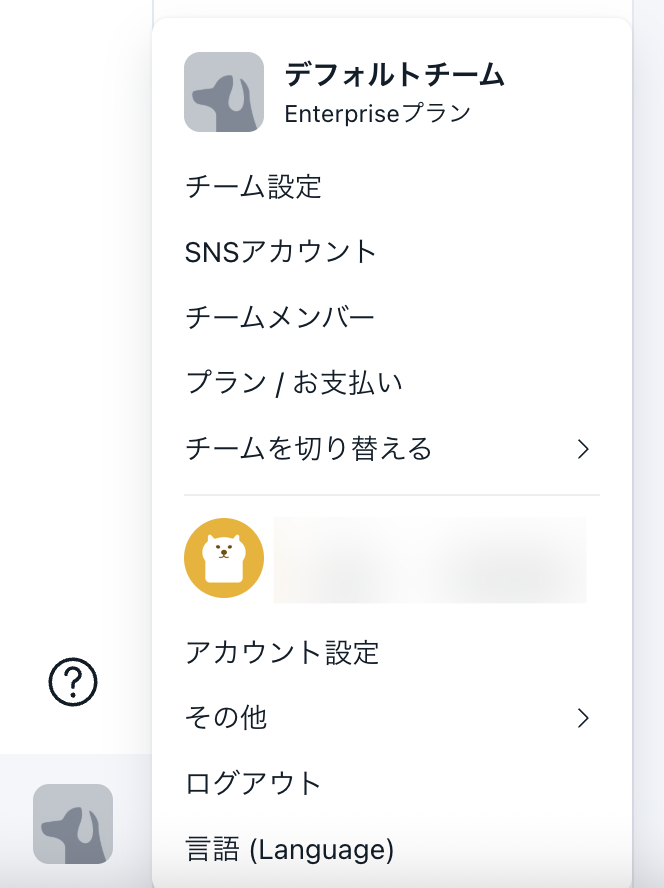
- Click the dog icon at the bottom left of the screen (top right of the screen if you are using a smartphone). An image set by your team might be displayed instead of the dog icon.
- Click [Log Out].
Log Out from the SocialDog App
- Open the SocialDog app.
- Tap the profile image of your X (Twitter) Account displayed at the top left of the screen. Depending on the screen, the dog icon or an image set by your team may be displayed.
- Tap [Settings].
- On the Settings screen, scroll down and tap [Log Out].
- A dialog box will appear asking you to confirm logging out. Tap [Log Out].