Last updated: 2026/5/29
Using a paid plan
This article explains how to change to a Paid Plan (from a Free Plan) and how to change the content of your Paid Plan.
Change to a Paid Plan
You can change your plan or billing cycle (monthly or yearly) at any time.
- Click the menu in the bottom left, and open [Plan / Billing].
- Click [Change plan].
- Click [Monthly] or [Yearly].
- Click [Start free trial] or [Select this plan] for the plan you wish to use.
- Enter your payment method.
- Credit card or invoice payment is available.
- Click [Proceed to confirmation screen].
- The confirmation screen will be displayed. Confirm the content displayed on the screen, such as changes and important notes.
- Click [Change plan] or [Start free trial].
- If the identity verification screen (3D Secure) from your credit card company is displayed, follow the on-screen instructions to complete identity verification. In the case of a free trial, completing identity verification will not result in immediate billing.
tip
When changing to a Paid Plan for the first time, a free trial will be applied. For details, please refer to Try a Paid Plan for free (Free Trial).
tip
You cannot change to a lower-tier Paid Plan. You will be able to change to a Paid Plan once you cancel your current Paid Plan and switch to the Free Plan.
What happens when changing from one Paid Plan to another Paid Plan
- Charges for the unused period of the previous plan
- It will be calculated on a pro-rata basis and become a "Credit", which will be applied to future bills.
- Billing cycle
- It will be reset, and the date of the plan change will become the start date, initiating a new 1-month or 1-year billing cycle.
tip
In the case of changing from a Paid Plan to a Free Plan (cancellation), the use of the Paid Plan will continue until the end of the billing cycle, and no credit will be generated for the unused period.
Example
If the plan is changed as follows on May 10:
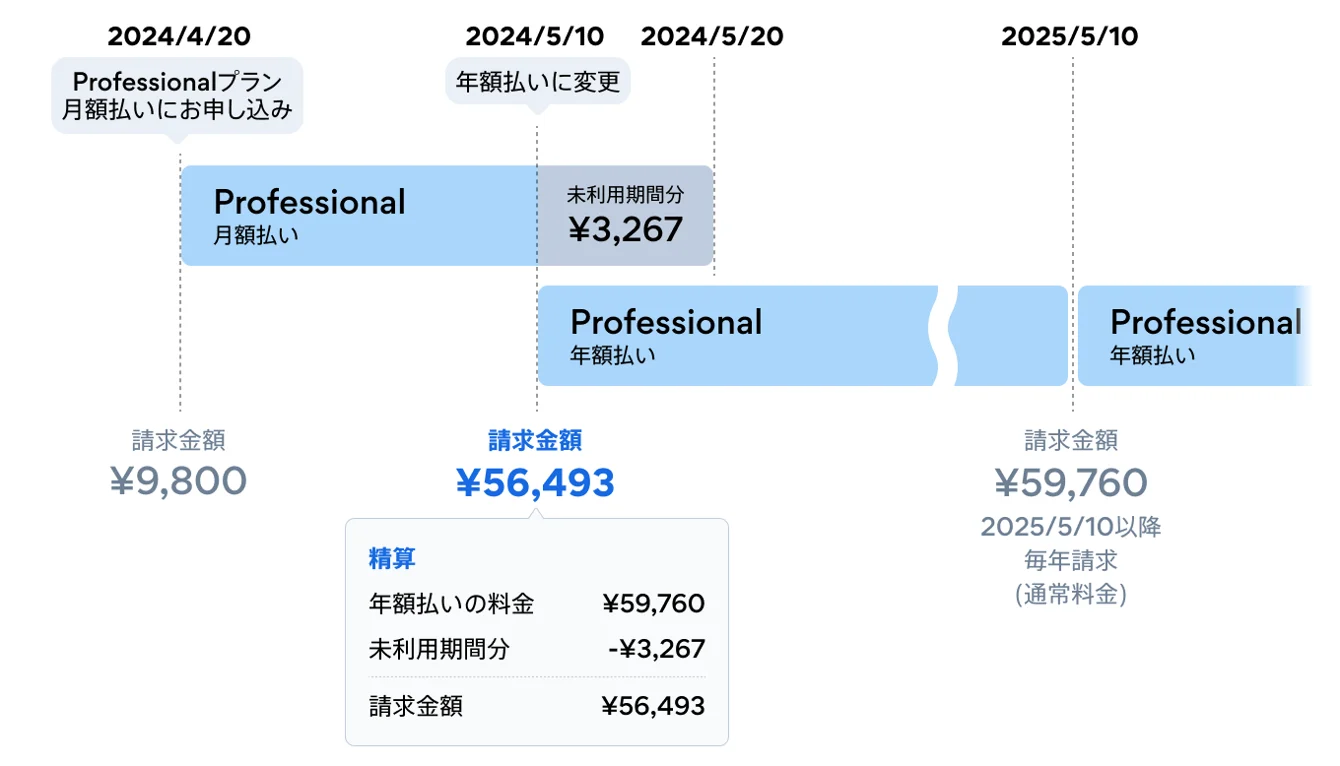
| Date | Description | Billing amount | Notes |
| April 20, 2024 | Payment Date | 9,800 JPY | Professional Plan (Monthly) fee |
| May 10, 2024 | Plan change | 56,493 JPY | Change from monthly to yearly. Details of the settlement are as shown in the table below. *From the next billing, it will be 59,760 JPY annually. |
| May 10, 2025 | Payment Date | 59,760 JPY | Professional Plan (Yearly) fee |
| May 10, 2026 | Payment Date | 59,760 JPY | Professional Plan (Yearly) fee |
Confirming Billing Cycle and Free Trial Period
- Click the menu in the bottom left, and open [Plan / Billing].
- You can confirm the next billing date and the end date of your free trial period.