Last updated: 2026/5/29
Competitor summary (X)
「Competitor summary (Beta)」 (formerly "Benchmark") allows you to compare metrics between your connected account and competitor accounts you wish to analyze.
Metrics you can check
-
Number of posts
-
Posting frequency
-
Number of followers
-
Follower growth rate
-
Number of following
- Engagements (Beta)
- You can check impressions, engagements, and breakdowns of post counts by type.
- Engagements (Beta)
-
Social profiles that cannot be searched cannot be analyzed. Examples of unsearchable social profiles are as follows:
- Private accounts
- Other social profiles from which SocialDog has not acquired data
Displaying Competitor Account Information
- From the menu, click [Analytics] → [Competitor summary].
- Enter the target username (name starting with @) in the search bar at the top of the screen, "Search by X (Twitter) username", or click on a competitor account displayed on the screen.

- The trend of competitor account metrics will be displayed on the screen.
Adding Competitor Accounts
- Display competitor accounts by following the steps in "Displaying Competitor Account Information".
- Click the "Add to Competitor Accounts" button in the upper right corner of the screen.
Comparing Competitor Account Metrics
- Add multiple competitor accounts by following the steps in "Adding Competitor Accounts".
- Opening [Analytics] → [Competitor summary] will allow you to check information for multiple competitor accounts.
- By selecting a competitor account in the "Comparison with Competitor Accounts" table, you can view data only for that account.
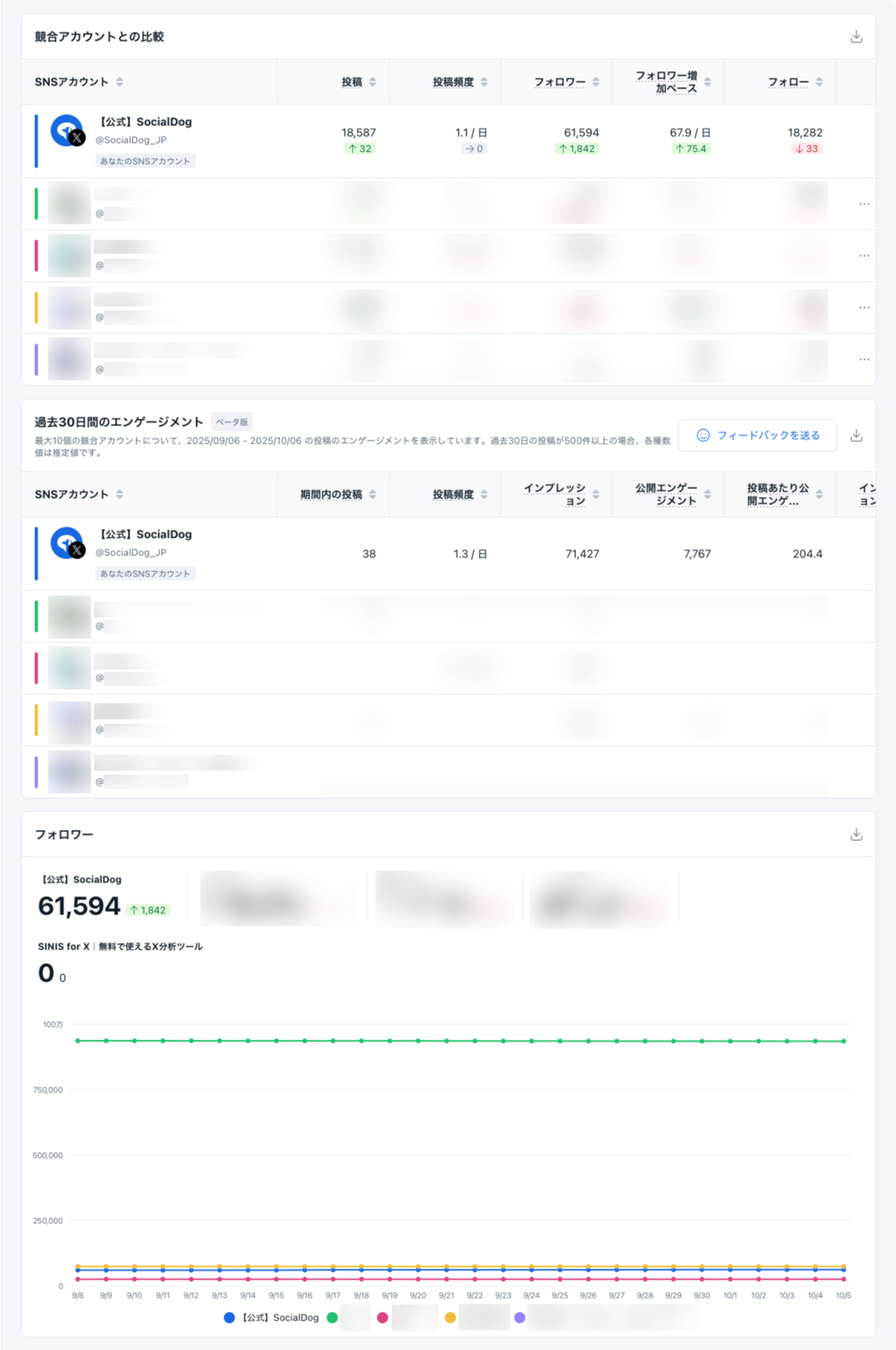
Analyzable Items Displayed
- Comparison with Competitor Accounts
- Posts: Number of posts on the last day*.
- Posting Frequency: Number of posts per day during the period.
- Followers: Number of followers on the last day*.
- Follower Growth Rate: Number of follower increases per day during the period.
- Following: Number of following on the last day*.
- Engagements
- Posts within the period: Number of posts during the period.
- Posting Frequency: Number of posts per day during the period.
- Impressions: Total number of times posts were displayed to users on the timeline or in search results.
- Public Engagements: Sum of replies, likes, reposts, quote posts, and bookmarks.
- Public Engagements per Post: Public engagements per post.
- Public Engagements per Impression: Public engagements per impression.
- Likes: Total number of times users "liked" posts.
- Replies: Total number of times users replied to posts.
- Reposts: Total number of times users reposted posts.
- Quote Posts: Total number of times users quote posted posts.
- Bookmarks: Total number of times users bookmarked posts.
- My normal posts: Number of posts other than my replies/reposts.
- My replies: Number of my replies.
- My reposts: Number of my reposts (retweets).
- Posts without media: Number of posts that do not include media (images, videos, GIFs).
- Posts with images: Number of posts that include images. Does not include posts that include media other than images.
- Posts with videos: Number of posts that include videos. Does not include posts that include media other than videos.
- Posts with GIFs: Number of posts that include GIFs. Does not include posts that include media other than GIFs.
- Posts with multiple media types: Number of posts that include multiple media types among images, videos, and GIFs.
- Followers (Graph): Trend in the number of followers for your account and competitor accounts.
- Follower increase (Graph): Daily follower increase for your account and competitor accounts (number of new followers minus the number of unfollows).
- Following (Graph): Trend in the number of following for your account and competitor accounts.
- Following increase (Graph): Daily following increase for your account and competitor accounts (number of new follows minus the number of unfollows).
- Posts (Graph): Cumulative number of posts for your account and competitor accounts.
- Post increase (Graph): Daily number of posts for your account and competitor accounts.
tip
Even if you change the display unit (month, week, day), the units for "Posting Frequency" and "Follower Growth Rate" do not change. The display unit (month, week, day) only affects the graph.
Sorting Data
- Selecting the header row of a table allows you to sort by that column in ascending or descending order.
- When sorting by "Social Profile", the first row displays your own social profile, and subsequent rows are displayed in the order they were registered as competitor accounts.
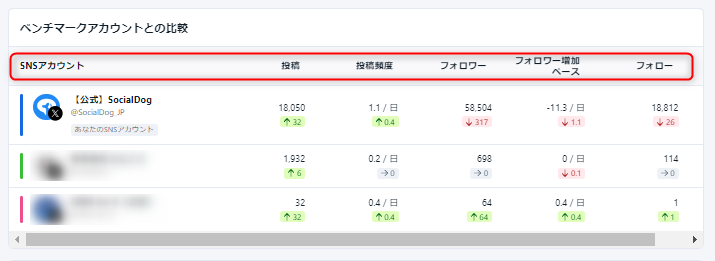
- When sorting by "Social Profile", the first row displays your own social profile, and subsequent rows are displayed in the order they were registered as competitor accounts.
Deleting from Competitor Accounts
- From the menu, click [Analytics] → [Competitor summary].
- In the "Comparison with Competitor Accounts" table, click the competitor account you want to delete.
- Click [Delete from Competitor Accounts].
tip
For competitor analysis of Instagram accounts, "Competitor post performance" is available.